
FAQ
In September 2025, we launched a version of a new Handbook website. The new Handbook website maintains all the functionality of the existing Handbook website, but we’ve introduced enhancements in several areas:
- We’ve introduced richer search functionality to make it easier for you to find what you’re looking for. You’ll be able to achieve nuanced and granular results using keywords and filters to narrow down or expand your search.
- We’ve made the context of our rules easier to understand. Our new taxonomy clearly sets out the connections between different parts of the Handbook. Moving forwards, our rules will be linked to relevant explanatory policy material, such as consultation papers and policy statements.
- We’ve improved the Handbook’s timeline functionality by adding new ‘track changes’ features that enable you to compare different versions of a chapter or section of the Handbook. For further information on how to use the new site, see our new User guides.
We’ve made no changes to the structure or content of the Handbook itself as part of the redesign of the website – the Handbook will continue to be updated as normal (see ‘How often is the Handbook updated?’ below).
Known issues
- We’re aware that some of the tables on the Handbook website are not formatted correctly. We’re also aware that our new track changes features may not work as expected on some larger tables, and that these tables are also slowing down our advanced search functionality in some cases. We are working to resolve these issues.
- We’re aware that the content in certain annexes may not be displaying correctly. This affects these annexes:
- COBS 13 Annex 2
- COBS 13 Annex 3
- CONRED 4 Annex 21
- CONRED 4 Annex 22
- DISP Intro
We are working to resolve these issues. In the meantime, please refer to the legal instruments.
We’d love to hear your feedback about the Handbook website.
If you’d like to provide your thoughts on the new Handbook website design and functionality, you can let us know what you think here.
If you’ve found a technical issue with the site, you can let us know about it using the link at the bottom of each page.
If you’d like to provide feedback on how well our rules are working, you can use the dedicated feedback tool we have developed as part of our Rule Review Framework. You’ll find a link to the Rule Review Framework feedback tool underneath each rule in the Handbook as well.
Please see our User guides page for instructions on how to use the Handbook website:
- Getting started with the FCA Handbook website provides an overview of the content on each of the pages of the site.
- The Handbook reader’s guide sets out more detailed information about the Handbook, including how it is structured and how to read the provisions.
- How to search for content on the FCA Handbook website covers the search functionality and how to achieve optimum search results.
- Our guide to Using the timeline sets out how to view the Handbook as it existed on any date in the past or the future, including how to use our ‘track changes’ functionality.
If you’re trying to do something that isn’t covered by the information in these guides, you can ask for help at handbook.feedback@fca.org.uk.
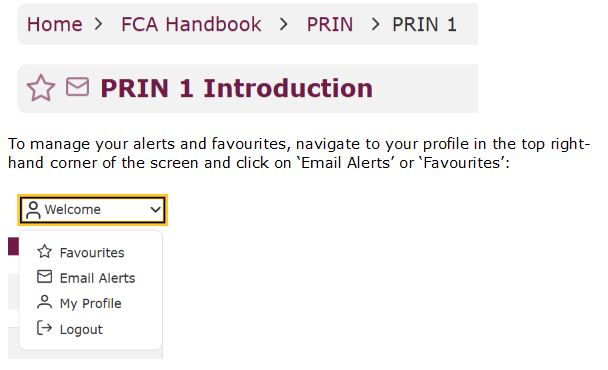
If you had an account on the previous Handbook website, you’ll need to create a new account (for further information, see ‘What is the new Handbook website?’ above). This will enable you to ‘favourite’ key parts of the Handbook and sign up to alerts using the star and email icons:
The Handbook reader’s guide sets out how to get started with navigating through the Handbook. This page includes a quick reference guide that sets out the content covered by each of the blocks and modules in the Handbook.
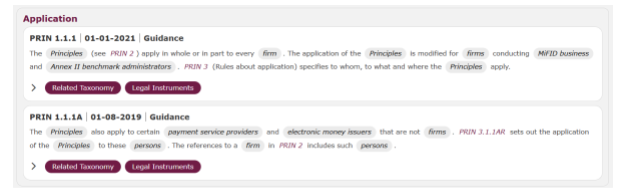
Each sourcebook in the Handbook includes an application section that sets out who it applies to. For example, the application section for the Principles for Business sourcebook is set out below.
If you’re looking for information about a particular topic, you can search for it using our Advanced search functionality. This searches across the whole site and provides you with a list of results that are broken down per page to give you a comprehensive picture of where to find further information. If you want to search within a particular page, you can use the search bar at the top of each page. For example, if you’re trying to find a particular legal instrument, you can search for it via the search bar highlighted below:

For information about how to use the search functionality, including how to use filters and keywords to achieve optimum search results, see our guide to How to search for content on the FCA Handbook website.
You can use our timeline functionality to access past or future versions of the Handbook, the Glossary and the Technical Standards. You can also compare different versions of these pages to show the changes that have been made between two dates, giving you a comprehensive picture of how they have changed over time.
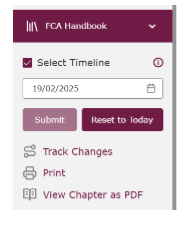
You can access the timeline and track changes functionality via the left-hand side bar:
For further information on how to use the timeline, see our guide to Using the timeline.
The Handbook is machine-readable. ‘Machine readability’ means every part of the Handbook website is ingestible, searchable and readable by a computer.
The FCA Board normally meets at least 10 times a year to approve legal instruments. Following Board approval, legal instruments are published on the Handbook website, alongside a corresponding policy statement or Handbook Notice on the main FCA website. You can stay up to date with the latest changes to the Handbook by signing up to alerts – see ‘How do I create an account on the Handbook website?’ for further information.
Fca.org.uk is the channel for news, publications (including non-Handbook guidance) and general information about the FCA. Read more about the FCA and what we publish.
The FS Register is a public record of firms, individuals and other bodies that are, or have been, authorised by us or the Prudential Regulation Authority.